
Hack the Box - Incident Response - Meerkat
Updated: Mar 31, 2024
Attackers workflow mapped

Attacker's Summary
This summary will cover the attackers workflow as discovered from my point of view. I believe the attack first started with port scanning based on the high volume of SYN packets to various ports. While looking through web request logs I discovered HTTP POST and GET Requests. From here, there was a credential stuffing attempt against the target that eventually lead to a successful authentication. The attacker took advantage of CVE-2022-25237 to conduct a command injection attack, where they passed a bash command to curl a SSH key from a pastebin into the authorized keys folder.
Triaging Summary
We are provided with a pcap file and Suricata alerts in a JSON file which you can import into Brimcap (Brim Security) with the Suricata Module.
References
Sherlock Questions
1. We believe our Business Management Platform server has been compromised. Please can you confirm the name of the application running?
For this question, I felt I could quickly and accurately narrow down our surface area by filtering the packet capture by protocol. It was likely that the Business Management Platform was a cloud app communicating with clients over HTTP. I also observed the Bonita soft string when analyzing the pcap from within DynamiteLab, a free online pcap analysis software.

2. We believe the attacker may have used a subset of the brute forcing attack category - what is the name of the attack carried out?
While my initial response to this question was an assumption that credential stuffing was the answer, it only took a quick glance at the http packets to reveal a packet stream of form submissions to the bonita login service over one hundred times.

3. Does the vulnerability exploited have a CVE assigned - and if so, which one
While there was a quick solution, I want to point out the manual solution first. While it was simple, it is a good reminder that a simple string or IOC can help a researcher identify a documented attack such as a CVE. In the below image you can see an HTTP POST request with an unusual string appended after the "pageUpload". Grabbing this POST request in combination with a google search provides us with the CVE immediately.

Dynamite lab, an online packet analysis tool provides a view of malicious attacks identified in the packet capture, and visualized as Alerts in the upper right dashboard of the below image.

To see more information on the specific alerts in the upper right dashboard, simply hover the mouse over the alert title and name and CVE identifier will appear in a floating box.

4. Which string was appended to the API URL path to bypass the authorization filter by the attacker's exploit
This question was answered in the above, but let us view it again and talk about what happened in this CVE. The below image is the evidence of the POST request, showing a unique string being appended /api/pageUpload.

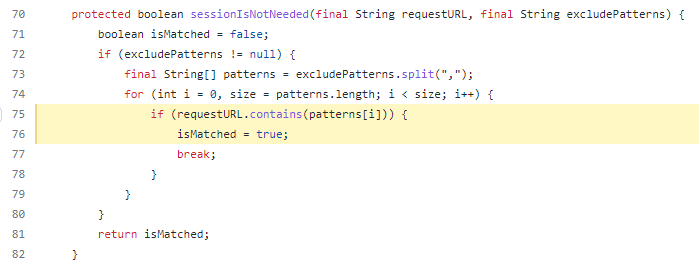
The vulnerability is derived from improper exclusions added to the servers web.xml file. These "exclude patterns" can be viewed as a whitelist in a sort of way. In the picture below, we are looking at filters for the incoming requests that are then processed by the application routing. If the filters apply, the application may be routed differently.

We can see in the routing portion of the bonita application, that the server routes resource requests as true, if the URL contains the string of excluded pattern.
5. How many combinations of usernames and passwords were used in the credential stuffing attack?
This question took me for a loop and I was not able to find a silver bullet of a solution, because some manual filtering is required. When we look at the HTTP post requests to the Bonita Login service we see there are many duplicates of the credential submission "install:install". However, the duplicates always followed a unique credential submission, allowing you to quickly tally up and remove them from the total count.
Removing as well the successful login attempt, you will be left with 56 valid and unique combinations.
6. Which username and password combination was successful?
This question is quite straight forwards. We know that failed login attempts always have a 401 response for a failed attempt. This allows us to look for the odd packet out and in particular it is a 200 - 204 response we are looking for. In this image below, you can see the POST attempt to the bonita login service, which was then followed by a response of 204 indicating a successful submission of credentials.


7. If any, which text sharing site did the attacker utilise?
At this stage of the investigation, I had already seen the string, as it was another http request to Bonita. The site utilised was pastes[.]io.

8. Please provide the filename of the public key used by the attacker to gain persistence on our host.
With the information from question 7, we can help to answer this question. In the previous question we identified a public paste bin URL. We will actually browse to that URL to help solve this challenge. The paste is simple, a bash script to curl a ssh key stored on a public paste bin, and append it to the local authorized keys folder.

9. Can you confirmed the file modified by the attacker to gain persistence?
This question was answered by our findings in the previous question. Where the actor curled an SSH key from a public paste bin, and appended it to the authorized keys folder.
10. Can you confirm the MITRE technique ID of this type of persistence mechanism?
The MITRE technique ID of this type of persistence mechanism is T1098.004. https://attack.mitre.org/tactics/TA0003/


Comments